87 minutes waiting for a cluster that was never going to finish
October 9, 2026
My Azure cluster sat in a creating state for 87 minutes without a single error. The cause was a network rule no log showed. What each Azure instrument sees, and what it doesn't.
The Kubernetes cluster in my Azure lab sat in a creating state for 87 minutes without a single error in any log. Just a progress bar that wasn't moving.
I checked the firewall first, because all of the cluster's traffic goes out through it and its logs were on. They came back clean, and that was my mistake: I was looking in the one instrument that couldn't see the problem.
The rule I wrote myself
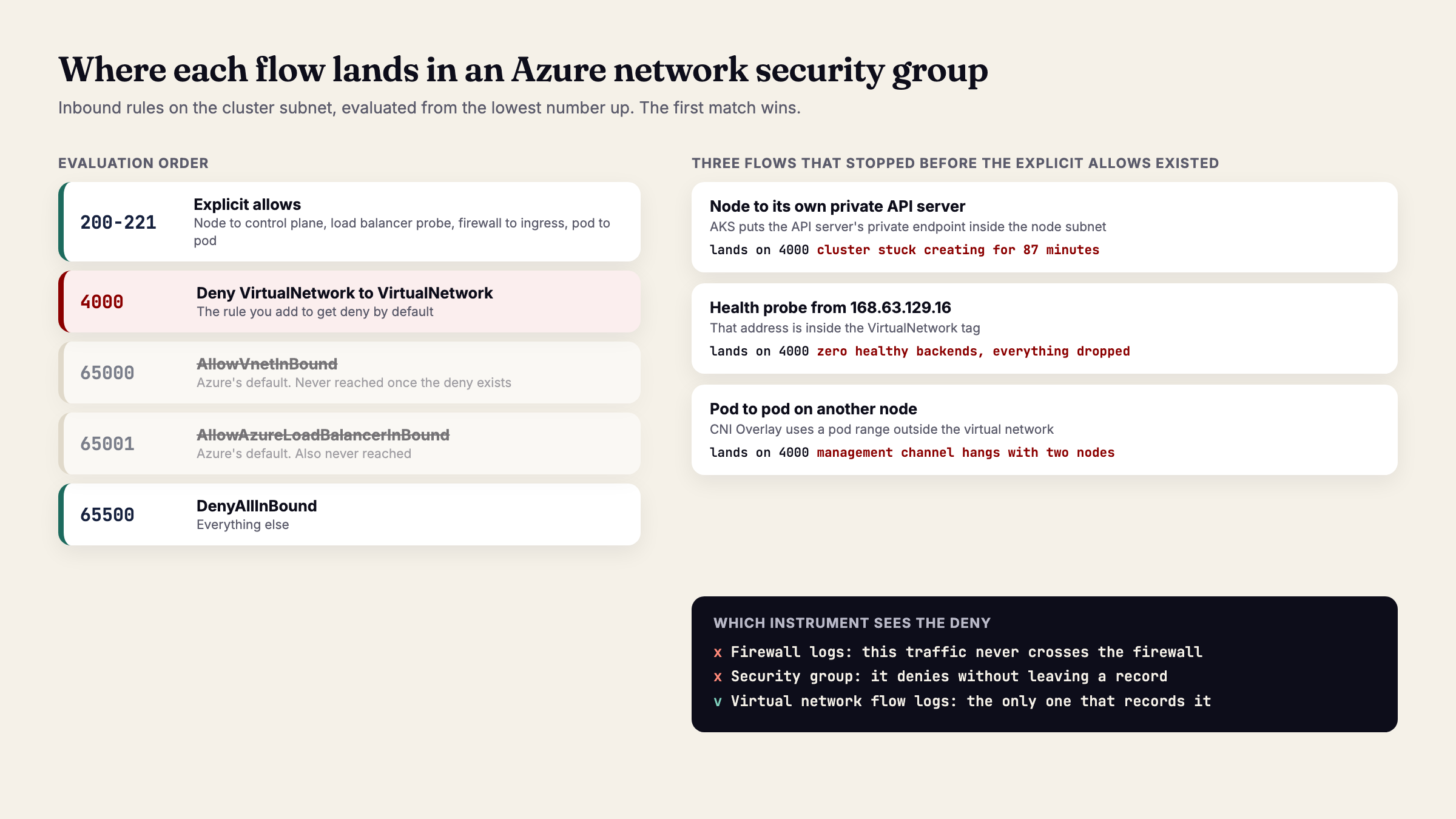
Every Azure network security group comes with a rule that allows all traffic inside the virtual network. In a custom Google Cloud network, inbound traffic is denied by default; on Azure you have to override that rule, and I did, with a deny at priority 4000 so nothing could talk to anything without explicit permission.
To be precise: a security group's default inbound rules are AllowVnetInBound at priority 65000, AllowAzureLoadBalancerInBound at 65001 and DenyAllInBound at 65500. The VirtualNetwork tag covers the network's address space, peered networks and the platform address 168.63.129.16. Any rule with a lower number wins over all three.
What I didn't know is that AKS places the private endpoint of the API server, the cluster's control plane, inside the node subnet. A node talking to its own control plane is the subnet talking to itself, and my deny was cutting it off.
That traffic is delivered inside the subnet and never crosses the firewall, which is why the firewall's logs were clean. And a security group doesn't log what it denies unless you turn on flow logs, which I didn't have at the time.
The fix was one rule: let the cluster subnet talk to itself.
The second time, wearing a different face
Later I put an internal load balancer in front of the ingress. It came up, took its private address, reported zero healthy backends and dropped everything, silently again.
The load balancer's health probe comes from an Azure platform address that falls inside the virtual network tag. Azure has a rule that allows it, but at priority 65001, below my deny at 4000, so it was never evaluated. Same mechanism, same silence.
What each instrument sees
The lesson wasn't the rule. It was that knowing what each instrument doesn't observe is worth as much as knowing what it does.
Firewall logs see what crosses the firewall, and traffic inside a subnet doesn't. The security group denies without leaving a trace. What does see dropped traffic inside a network is virtual network flow logs, so in the published lab they're on from the first deployment, in their own storage account that costs a few cents a month.
On Google Cloud you switch logging on per firewall rule, and it records what that rule decides, denials included. On Azure the closest thing is flow logs, switched on for the whole virtual network. If you come from Google Cloud looking for the per-rule switch, you won't find it.
| Option | Cost | Risk | Verdict |
|---|---|---|---|
| Keep Azure's rule that allows everything inside the network | CostNothing | RiskOne compromised machine can talk to all the others | VerdictRejected |
| Deny everything at priority 4000 and open by exception | CostDeclaring every legitimate flow, and the one you forget fails silently | RiskHours spent in the wrong log | VerdictChosen |
| Turn on virtual network flow logs | CostA storage account and a few cents a month | RiskNothing that matters in a lab | VerdictChosen: it's the only thing that sees the deny |
What I wrote down
Both rules are declared in the code with a comment explaining why they exist, because six months from now someone will see a permission that looks unnecessary and want to delete it. They live in the repository's platform layer.
The pattern came back a third time when I scaled the cluster to two nodes. Traffic between pods on different nodes uses addresses outside the virtual network, and the same deny was dropping it. With one node it would never have shown up. Same family of problem, and this time I started with the network rules instead of the firewall.
If something in your system stops working silently tomorrow, do you know which of your logs is blind at exactly that spot, or will you find out by searching it?